
How to Manage Multiple Projects on the WhatsApp Multiple Workspaces Platform
How to Manage Multiple Projects on the WhatsApp Multiple Workspaces Platform
Are you having trouble keeping track of multiple projects, clients, and team chats in one location? You are not alone. According to research, 70% businesses frequently lose valuable time in switching between chat rooms, project boards, apps, and other systems each week.
This situation easily turns into a mess when using one WhatsApp account to monitor all projects. Messages get repeated, files go missing, and crucial information gets buried in long chat histories.
Hence, progressive businesses are currently implementing the WhatsApp multiple workspaces Platform - a smarter approach to managing conversations, maintaining distinct projects, and enhancing the productivity of a team without leaving the application. WhatsApp multi-workspaces allow companies to have complete transparency with their WhatsApp communication, which makes project management simpler and quicker.
You May Also Like: How to Maximise Campaign Impact with WhatsApp Broadcast Messages
The Communication Challenge in Managing Multiple Projects
To business owners and managers, it is usually a balancing factor when it comes to taking up various projects at the same time. In every project, there are various stakeholders, time limits and communication requirements. In cases where such discussions are conducted through a single WhatsApp group or inbox, it becomes hard to:
- Concerning the messages that are part of a project.
- Keep the information within the teams or clients confidential.
- Monitor deliverables and schedules.
Get rid of overloaded messages and lost updates.
Teams sometimes waste hours searching for a file or chat thread, which may create confusion and lower accountability. This communication chaos impairs productivity and ultimately impacts client satisfaction. Businesses need a more intelligent way to manage the organisation of their workflows—something the WhatsApp multiple workspaces System solves very well.
Introducing the Smarter Way: WhatsApp Multiple Workspaces Platform
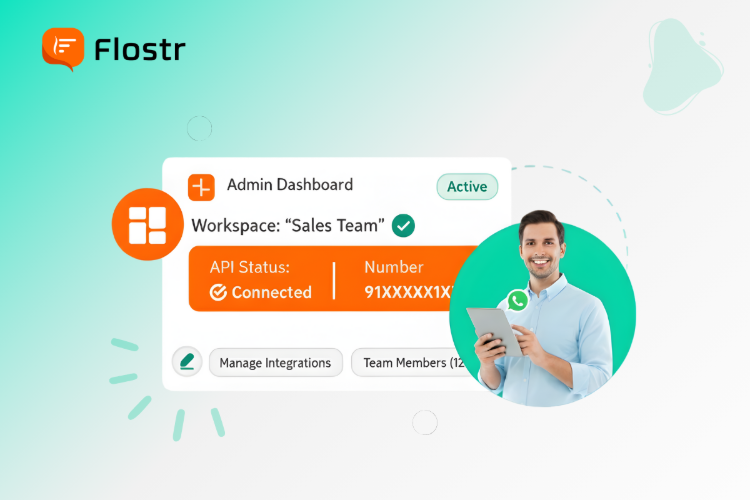
The WhatsApp multiple workspaces platform provides a business with absolute freedom in the way it handles communication between various projects or departments. They do not use a single shared number to perform all operations, but have individual WhatsApp numbers and settings in each workspace.
This implies that you can have separate workspaces depending on a project, department, or client and have all the conversations, files, and activities of that specific space in one focused space. For example:
- Your internal marketing team may have workspace A.
- Client communication of Project X could be done at Workspace B.
- Your support team could use the workspace C.
Workspaces are separated, and this removes duplication and enhances clarity. Integrated tools such as WhatsApp Business analytics can help managers keep track of performance, interactions, and key insights, and make more informed decisions based on this data.
The business can save time, enhance teamwork, and create a uniform communication experience without using numerous applications and platforms.
How to Use the WhatsApp Multiple Workspaces Platform
The utilisation of the platform is easy and user-friendly. A business would only have to follow a few steps to create and customise its working environment:
Create a New Workspace
Open your account and go to create a space. Type in a workspace name and a brief description of what the workspace is meant to be.
Assign a Dedicated WhatsApp Number
All workstations use different WhatsApp numbers. This will allow separation and clarity among teams or projects.
Add Employees or Team Members
Invite current employees, or, in case of the creation of new user profiles, one can assign them to the particular workspace. This assists in limiting access to relevant projects.
Customise Settings and Tools
Every workspace has new data and an environment. You can enable WhatsApp chatbots, message templates or analytics tools depending on the needs of your team.
Monitor and Analyse Using WhatsApp Business Analytics
Use built-in analytics to track the message volumes, response time and engagement patterns. This information assists managers in knowing how they perform, client satisfaction, and improvement areas.
By following these few straightforward steps, companies can establish several workspaces to organise their WhatsApp activities and make their day-to-day activities more productive and evidence-based.
Why Choose Flostr WhatsApp Multiple Workspaces Platform
The Flostr WhatsApp multiple workspaces platform provides companies with an organised manner of managing communication without losing the convenience of WhatsApp. These are the results of some of the main advantages:
Adequate Management
All workspaces are project-related, and conversations and files remain in their context. This saves time and avoids confusion.
Enhanced Privacy and Control
Confidential information is shared with authorised members of the team only, and each workspace has a different WhatsApp number.
Improved Collaboration
The members of the team can easily work together in their respective workspaces without having to hopscotch between the apparently endless list of chat groups or applications.
Actionable Insights through WhatsApp Business Analytics
Through the built-in analytics, managers can improve the response time of the teams, customer satisfaction, and efficiency of the workflow across all the workspaces.
Scalable and Flexible
You can have two or twenty projects, and the platform will work with Flostr. You are free to add, edit or delete workspaces.
Faster Decision-Making
Structured communication results in faster approvals and faster responses, which ensure projects are on time.
With the simplicity of WhatsApp and the structured lifestyle of Flostr, businesses will stand to receive the best of the two worlds, as they can combine real-time communication and smart organisation.
Conclusion: A Simpler, Smarter Way to Manage Projects
There is no need to make the control of several projects complex and chaotic. By using WhatsApp's multiple workspaces platform, firms have the opportunity to stay in control of the communication channel, allocate teams, and keep track of all matters within a single centralised system.
Flostr can assist businesses with improving their operations, securing the data regarding their clients, and increasing the visibility of their operations with the use of real-time analytics. With this new modern form of communication, you are not only wasting your time but also enhancing teamwork and responsibility at all levels within your organisation.
When your company has a problem related to disorganised WhatsApp chats and poorly organised projects, then it is time to switch to a more intelligent, workspace-based communication platform.
Try Flostr WhatsApp multiple workspaces Platform today for data-driven communication. Streamline your processes and provide your teams with all the transparency they need.
Frequently Asked Questions
1. What is the WhatsApp multiple workspaces Platform?
It is an enterprise application that enables organisations to handle various projects or teams with distinct WhatsApp working environments on a single platform.
2. Can I use different WhatsApp numbers for each workspace?
Yes. Every workspace has its own WhatsApp number, which is private and clear in communication.
3. How does WhatsApp Business analytics help on this platform?
Analytics enable information about the performance of messages, the rate of response and the effectiveness of teams in order to enhance customer experience and project management.
4. Is the Flostr WhatsApp multiple workspaces Platform suitable for small businesses?
Absolutely. It is scalable and only requires companies of any size to streamline their communication through WhatsApp.
5. Can I customise each workspace according to my project needs?
Yes. Every workstation is capable of having its own preferences, team members, and automation tools to be as flexible as possible.
Want to grow faster & smarter?
Try Whatsapp Automation Marketing.
If yes, Then Explore Flostr's Powerful Feature -


Want to Boost Your Brand Visibility with WhatsApp?
Grow Your Marketing Reach With Flostr’s WhatsApp AI
Connect with your audience, create lasting brand impressions, and get the best outcomes.